Mohiomap Project Managment by Files

The website: https://www.moh.io

I have recently started using evernote to organize my projects. When I was researching applications that integrate well with the tool, I ran into this fantastic site. It creates a mind map based upon the contents of various cloud storage services you may use. I am still working on the best way to utilize the site, but being able to generate a navigable mind-map with little effort is fantastic!

From the site …
https://www.moh.io/mohiomap-blog/mohiomap-tip-3-project-management/

Posted in Uncategorized | Leave a comment

Microsoft Pivot

Microsoft has a great tool for dealing with large amounts of data. Gary Flake does a good job of demonstrating the technology in this video.

The really nice thing is it is now extremely easy to make your own pivot files by using a plug-in Microsoft has made for Excel. Just made a nice one using my wife’s goodreads.com account which lets you export all the information minus the pictures to a .csv file.

Posted in Uncategorized | Leave a comment

Usefull Project Managment advice.

Arnold’s First Law of Documentation
If it should exist, it doesn’t.

Arnold’s Second Law of Documentation
If it does exist, it’s out of date.

Arnold’s Third Law of Documentation
Only useless documentation transcends the first two laws.

Posted in Uncategorized | Leave a comment

Screencasting

All Project Managers need to have the ability to share information. Screencasting is a technique for recording what is happening on the system while the system is being used. The top tool and my personal favorite is Camstudio Here is a demo of this free tool.

I was going to do a demo of the Microsoft screencasting utility Expression Encoder 4 but it was having a hard time keeping the audio so I would not recommend it at this time.

You can find a good comparison of all screencasting software here

Posted in Uncategorized | 1 Comment

Microsoft Project Alternative

I have a love hate relationship with Microsoft Project. Real life projects never truly feel like they fit in MS Project. Good for us MS Project is not the only tool to chose from. One of the new ones is teambox. Their short overview covers the service very well. What I love about this service is the integration with smart phones. That feature alone would be invaluable to certain infrastructure types of projects.

Posted in Uncategorized | Leave a comment

Data visualisation tool Tableau

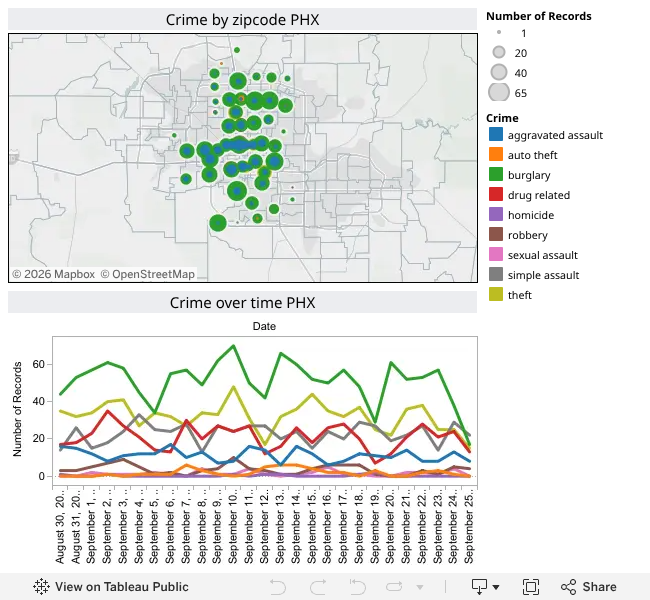
Tableau is a great tool with a simple tutorial on their site. I have made an interactive dash board in about 30 mins showing crime over the last 30 days for Phoenix AZ.

Dashboard 1

Dashboard 1

Going to be spending more time with this tool.

Posted in Uncategorized | 2 Comments

Moving Data

A common problem for any PM is when large amounts of data need to move from one team member to another.  The ideal way to move the data is to have a shared location on a server accessible by everyone with no storage limits.  If you do not have that option then I recommend trying

JetBytes

This service will take any file from one computer and transfer it to any other computer without installing any software and without storing the data.

The steps I take are as follows.

1 –  Zip the files I need to transfer and encrypt them.

2 –  Open JetBytes and browse to the file that I just created.

3 –  JetBytes will create a URL that I will then send in e-mail or IM to the team member that needs the files.

4 –  Once they click the link I will see the data start to transfer.  I need to leave my computer on and the window open until the transfer is complete.  Once done I close the window.

The only issue I have had with this service is that sometimes team members think the download link you send them is permanent.  You need to explain to them that the link will only work once and then never again.  To do another transfer a new session will need to be setup.

There is no file size restriction for this service so the only real constraint is the speed of the network between the two parties.

Posted in Uncategorized | Leave a comment

Excel Tip

Going back to my favorite data source the UN statistics division I wanted to show how to link two large data sets in excel.

Data set 1 – Total population, both sexes combined (thousands)
Data set 2 – Wages and salaries

First I downloaded each set as a .CSV( Comma separated values) file.  Next I move a copy of each worksheet to the same workbook and save.   I do this because I will want an original copy of the raw data to look at to check what I am doing sometimes and to make the linking easier.   You can link across workbooks, but that is a little more complex.  Also any time you are dealing with large sets of data in excel you should save often.  Excel handles large data like a Vegas juggler handles bowling pins it does it well but sometimes everything crashes and it crashes quickly.  Saving often will keep you from having to try and pick up the pieces.

Next I will remove the duplicates based upon country and year.  I could leave them in but I know from experience that I want a simple end result which means getting rid of the stuff.  In excel under data there is a remove duplicates button.  Now I want to combine the data into one table so that I could pivot it for patterns.  Also I need to clean up the two data columns so the stuff I am comparing in the function match.  In plain speak if I have Albania in one tab I need to have Albania in the other.  Note if I have “Albania” in one tab and “Albania ” in the other it will fail because of the space on the end.   Always clean the data first.  Once you put in a complex function it will recalculate and eat up cpu cycles slowing you down greatly if you are still cleaning data.  So in the Wages tab I will go to the last column and add the following formula.   Column H Row 2

=INDEX(UNdata_Export_population!$D$3:$D$5524, MATCH(1,(UNdata_Export_Wadges!A2=UNdata_Export_population!$A$2:$A$5524)*(UNdata_Export_Wadges!C2=UNdata_Export_population!$B$2:$B$5524),0))

Then hit ctrl+shift+enter  to make it an array function

One advantage of the Excel index and match functions is that the lookup value can be in any column in the array, unlike the VLOOKUP function, in which the lookup value must be in the first column.

Now what this did is match the data in “Wages and salaries” by country and year to the population for that country and year in “Total population, both sexes combined (thousands)”  when there was a match it would copy the population and put it in the cell.  Copying the formula all the way down column H and you will have the population for the country year and occupation.

Posted in Uncategorized | 1 Comment

Gmail

Ever wonder in Gmail how to show all the e-mails from one person? Here is how you do it.

In the Search Mail box type “list: (email address)” hit enter

Example to show all email from jon.smith@HTC.com you would type “list: jon.smith@HTC.com” and hit enter. Then you would see all email from and sent to jon.smith@HTC.com

Posted in Uncategorized | Leave a comment

How the military goes about building a new gun

Flowcharts are like chocolate they are good in small amounts but try and eat to much at one time and you will end up sick. Below is an example end to end process flow from the Department of Defense.

Most people not familiar with flowcharts will see a complete mess. The truth is this level of flow chart lets you know two things. First the Department of Defense has well documented process flows. Second there is no reason to flow chart in this level of detail such a large life cycle. When you do this items that are not as important in the process flow get the same weight or more as items that are critical. Notice how many times and the size of the Initial Product Baseline occurs. In fact multiple process groups or documents are repeated throughout the graphic making it look bigger then it really is. The flash version available at the military website https://ilc.dau.mil/default.aspx (Note: this site requires the installation of a military certificate to your browser) does a better job of putting things in context.

The question that I have to ask is with such well defined process how is it that the military has a history of going over budget? Leave your creative comments below.

Posted in Uncategorized | Leave a comment